

I have been messing with Farming Simulator 22 and wanted to be able to play on my Apple Silicon M1 Max MacBook Pro and do not like using keyboard and mouse, especially with Farming Simulator. I have plenty of Xbox One/Series controllers and have one that I use specifically to game on my Mac and was absolutely mindblown to find that support doesnt natively exist on this game from Giants Software for some reason.
After digging in I found a post on the Giants Forum that finally did come to some conclusion to get things working but didnt clearly outline it so I wanted to share what worked for me.
Steps:
- Open Finder
- Navigate to your user folder within Macintosh HD > Users > [User Name]
- Usually this will be your full name as one word: ex: firstnamelastname
- Open Library folder
- If this folder is not showing in your user folder:
- Right Click
- Show View Options
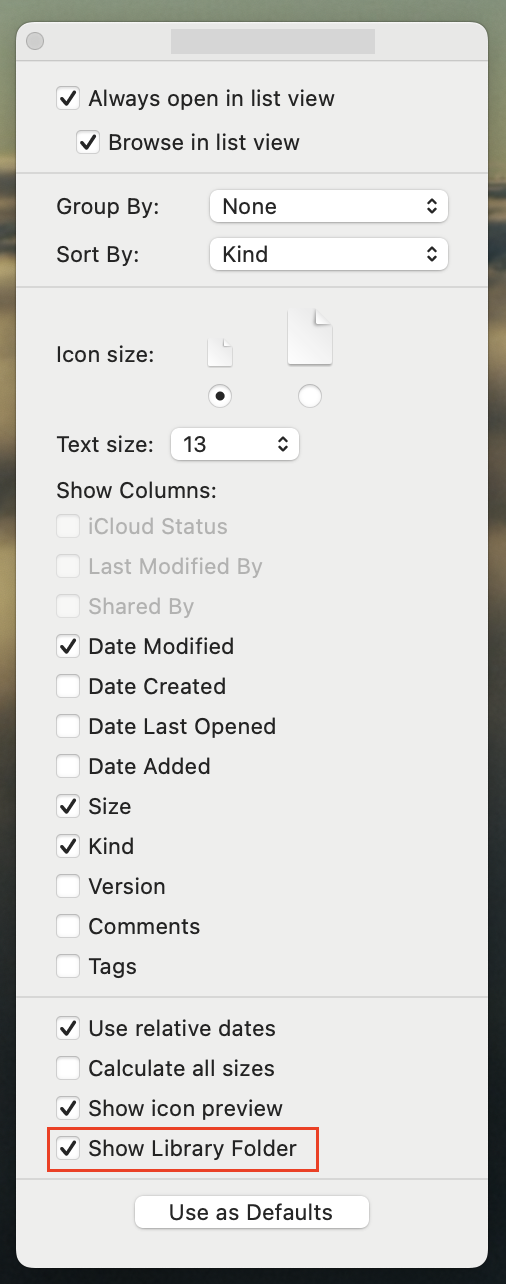
- Select “Show Library Folder” at the bottom of the popup window
Note: see screenshot below showing the box that needs to be selected.
- If this folder is not showing in your user folder:
- Open Application Support folder
- Find and open Farming Simulator 22 folder
- Open inputDevicesManual folder
- Add this file to the inputDevicesManual folder
The linked file is an xml map for the xbox controller for the game to use.
This should allow the xbox controller to be mapped in Farming Simulator 22, and hopefully this helps someone else. Once this file is in place, pair your controller with your mac, ensure the controller is on, and launch the game. At this point the controller should work as it did for me.
Screenshots

 Kevin Douglas's Blog
Thank you! I forgot where I originally found th method to fix this issue and there are so many half baked “fixes” out there. But THIS is EXACTLY what I needed to play with my boy!